How to Build a Website for a Photography Business
🔷 SnapBlock Build Guide
For a photographer, your website is your portfolio, your pitch, and your booking desk all at once. Here's what a photography website actually needs, why the work has to lead, and how to build one with SnapBlock just by describing it.
A photographer's website has an unusual job. For most businesses, the site describes the work. For you, the site is the work, a potential client's first impression of your eye, your style, and whether you're the right person for their wedding, their brand shoot, or their family portraits. They'll decide in seconds, mostly from what they see.
That makes the stakes clear but the build simple: let the images lead, make it obvious what you shoot and who you shoot for, and give people an easy way to reach you. This guide covers exactly what a photography website needs and how to build one with SnapBlock by describing what you want, no design software, no code, and no reason to hand your portfolio to a template that fights you.

1. The Work Comes First, Everything Else Is Support
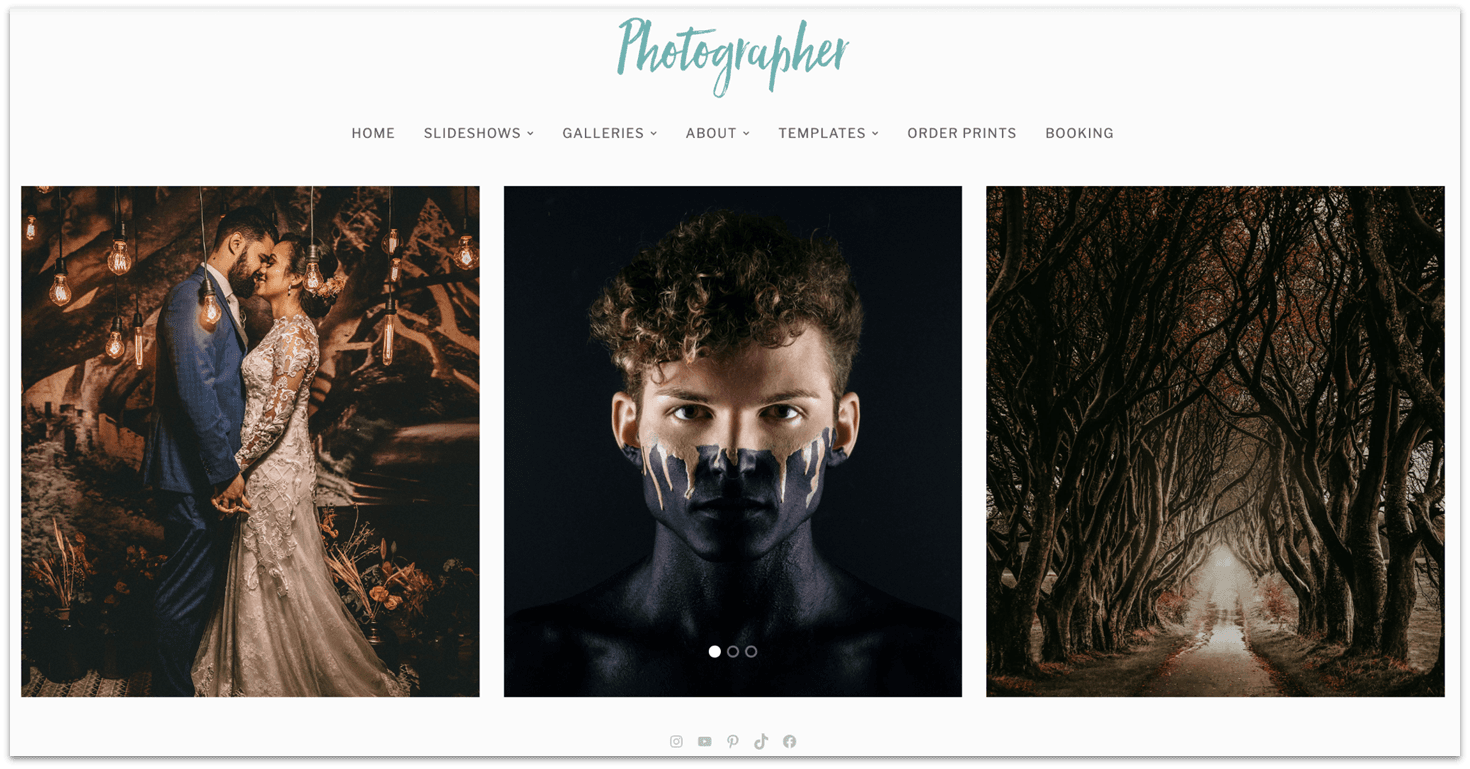
The single most important principle for a photography site is that your images should dominate. Visitors came to see your photographs, not to read about your philosophy or scroll past decorative page furniture. A clean, image-forward design that gets out of the way and lets the work fill the screen will do more for your bookings than any amount of clever copy.
This means resisting clutter. Busy backgrounds, heavy borders, competing colors, and dense blocks of text all pull attention away from the thing you want people looking at. The best photography sites feel almost sparse: generous space, restrained typography, and photographs given room to breathe. When you describe your site to SnapBlock, saying you want a clean, minimal design that puts the photography front and center is a genuinely useful instruction.
2. Curate Ruthlessly, Show Your Best, Not Everything
A common instinct is to show as much work as possible, on the theory that more choice means more chances to impress. In practice the opposite happens: visitors judge you by your weakest visible image, not your strongest. A tight edit of genuinely excellent work reads as confidence and taste; a sprawling archive reads as indiscriminate.
Curation also helps visitors understand what you actually do. If someone lands on your site looking for a wedding photographer, they should immediately see wedding work, not have to dig through product shoots and landscapes to find it. Organizing your portfolio into clear categories that match the work you want to be hired for helps the right clients recognize themselves in what they're seeing.
Build a Portfolio Site That Shows Off Your Work
Describe the look you want and the galleries you need, and SnapBlock builds it. Start for free and get a site that does your photography justice.
Start Building Free →
3. Make It Obvious How to Hire You
Beautiful work that leads nowhere is a missed booking. Once someone has scrolled through your portfolio and thought "this is exactly what I want," the path to contacting you should be immediate and unmissable. A clear contact route (a form, an enquiry page, a prominent way to start a conversation) is the difference between admiration and income.
It's also worth being clear about what you offer and roughly how working with you goes. Clients hiring a photographer are often doing it for the first time and don't know what to ask. A short, plain explanation of your services, the kinds of sessions you do, and what happens after they get in touch removes hesitation and makes reaching out feel low-risk.
What a Photography Website Needs
| Element | Why It Matters |
|---|---|
| A curated portfolio | Your best work, organized by the type of shoot you want to book. |
| A clean, quiet design | Keeps attention on the photographs instead of competing with them. |
| A clear way to enquire | Turns someone who loves your work into an actual booking. |
| An about page | Clients are hiring a person, not just a portfolio, trust matters. |
4. People Are Hiring You, Not Just Your Camera
Photography is unusually personal. A client is inviting you to their wedding, into their home, or into their brand's creative process. They want to know they'll like spending a day with you. That makes your about page more than a formality, it's where a visitor decides whether you're someone they want to work with.
A good photographer's about page includes a picture of you (clients genuinely want to see who they're hiring) and a few honest paragraphs in your own voice about how you work and what you care about. It doesn't need to be a life story. It needs to make you feel like a real, approachable person rather than an anonymous email address.

5. Build It by Describing It
Here's the part that makes this achievable in an afternoon rather than a month. With SnapBlock, you build your photography site by describing it in plain language: that you want a clean, minimal portfolio site with galleries for weddings and portraits, an about page, and a way for clients to enquire. It builds that, and you refine it by describing changes until the presentation feels right.
That matters especially for photographers, because you have a trained eye and specific opinions about how your work should be presented, but not necessarily the desire to learn design software to express them. Being able to say "give the images more space" or "make the gallery layout simpler" and see it happen means you can direct the design the way you'd direct a shoot, and keep the site current yourself as your portfolio grows.
The Takeaway
A photography website works when it gets out of the way: a tightly curated portfolio organized around the work you want to book, a clean design that lets images fill the screen, an about page that makes you feel like someone worth spending a day with, and an obvious path to enquire. None of that requires design software or code. Describe the site you want, refine it in plain language, and keep it current as your work grows, so the first impression a client gets is your photography at its best.
Ready to build your photography website?
Describe the galleries and the look you want, and SnapBlock builds a clean, image-forward site that turns visitors into bookings. Start for free today.
Start Building Free → See How It Works →